Google日本語入力にmacのユーザ辞書をインポートしたい。

PCにGoogle日本語入力をインストールし、今後はこちらで文字入力を行っていきたいと考えています。

そこで、これまでにmacやiPhoneで使用していたユーザ辞書をエクスポートして、

Google日本語入力へインポートしたのですが、

1.エクスポート時のファイルがplistというファイルになってしまう。

2.インポートの際に、txtで求められている。

その結果、

https://prnt.sc/EMLXtvC3qgpL

こちらの内容のエラーが表示されてしまいます。


解決策をご教示いただきたいです。

MacBook Pro 14″, macOS 26.1

投稿日 2025/12/09 23:46

返信
スレッドに付いたマーク ランキングトップの返信

投稿日 2025/12/10 22:44

Automator ワークフローで plist ファイルからテキストファイルを作成し、それを手動で Google 辞書にインポート、、、みたいにしてみてはどうでしょうか。


テキストファイルを作成する Automator ワークフローはこんな感じ。


作り方

  1. Automator.app を起動する
  2. メニューバー > ファイル > 新規 > ワークフロー
  3. JavaScriptを実行アクションを追加する
  4. シェルスクリプトを実行アクションを追加する
  5. JavaScript と シェルスクリプトのコード (下記) をコピペ
  6. 適当な名前で保存する (例: plist2tsv)


実行

  1. ウインドウのツールバーにある「実行」ボタンを押す
  2. ダイアログに従い xxx.plist を選択して「選択」ボタンを押す => plist と同じフォルダに xxx.txt が書き出される
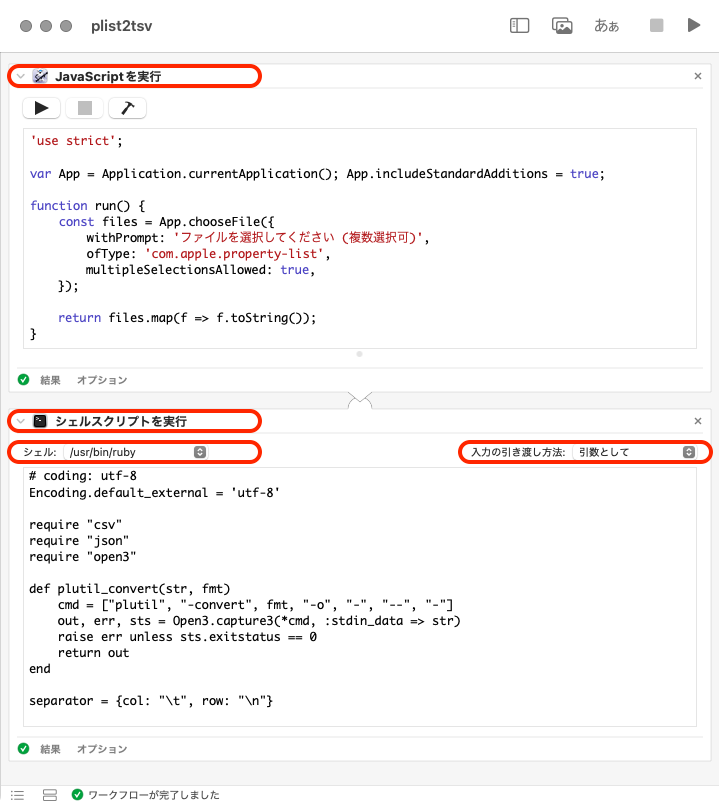


# JavaScriptを実行

'use strict';

var App = Application.currentApplication(); App.includeStandardAdditions = true;

function run() {
    const files = App.chooseFile({
        withPrompt: 'ファイルを選択してください (複数選択可)',
        ofType: 'com.apple.property-list',
        multipleSelectionsAllowed: true
    });

    return files.map(f => f.toString());
}


# シェルスクリプトを実行

# coding: utf-8
Encoding.default_external = 'utf-8'

require "csv"
require "json"
require "open3"

def plutil_convert(str, fmt)
    cmd = ["plutil", "-convert", fmt, "-o", "-", "--", "-"]
    out, err, sts = Open3.capture3(*cmd, :stdin_data => str)
    raise err unless sts.exitstatus == 0
    return out
end

separator = {col: "\t", row: "\n"}

ARGV.each do |f|
    dname, fname = [File.dirname(f), File.basename(f, File.extname(f))]
    newf = File.join(dname, fname << ".txt")

    plist = File.read(f)
    json = plutil_convert(plist, "json")

    CSV.open(newf, "w", col_sep: separator[:col]) do |row|
        JSON.parse(json).each.map do |i|
            row << [i["shortcut"], i["phrase"].gsub("\x22") {"\x1e"}, "名詞", nil]
        end
    end

    tuned = File.read(newf).gsub("\x1e") {"\x22"}
    File.write(newf, tuned, mode: "w")

    puts newf
end


返信: 4
スレッドに付いたマーク ランキングトップの返信

2025/12/10 22:44 shun8erman への返信

Automator ワークフローで plist ファイルからテキストファイルを作成し、それを手動で Google 辞書にインポート、、、みたいにしてみてはどうでしょうか。


テキストファイルを作成する Automator ワークフローはこんな感じ。


作り方

  1. Automator.app を起動する
  2. メニューバー > ファイル > 新規 > ワークフロー
  3. JavaScriptを実行アクションを追加する
  4. シェルスクリプトを実行アクションを追加する
  5. JavaScript と シェルスクリプトのコード (下記) をコピペ
  6. 適当な名前で保存する (例: plist2tsv)


実行

  1. ウインドウのツールバーにある「実行」ボタンを押す
  2. ダイアログに従い xxx.plist を選択して「選択」ボタンを押す => plist と同じフォルダに xxx.txt が書き出される


# JavaScriptを実行

'use strict';

var App = Application.currentApplication(); App.includeStandardAdditions = true;

function run() {
    const files = App.chooseFile({
        withPrompt: 'ファイルを選択してください (複数選択可)',
        ofType: 'com.apple.property-list',
        multipleSelectionsAllowed: true
    });

    return files.map(f => f.toString());
}


# シェルスクリプトを実行

# coding: utf-8
Encoding.default_external = 'utf-8'

require "csv"
require "json"
require "open3"

def plutil_convert(str, fmt)
    cmd = ["plutil", "-convert", fmt, "-o", "-", "--", "-"]
    out, err, sts = Open3.capture3(*cmd, :stdin_data => str)
    raise err unless sts.exitstatus == 0
    return out
end

separator = {col: "\t", row: "\n"}

ARGV.each do |f|
    dname, fname = [File.dirname(f), File.basename(f, File.extname(f))]
    newf = File.join(dname, fname << ".txt")

    plist = File.read(f)
    json = plutil_convert(plist, "json")

    CSV.open(newf, "w", col_sep: separator[:col]) do |row|
        JSON.parse(json).each.map do |i|
            row << [i["shortcut"], i["phrase"].gsub("\x22") {"\x1e"}, "名詞", nil]
        end
    end

    tuned = File.read(newf).gsub("\x1e") {"\x22"}
    File.write(newf, tuned, mode: "w")

    puts newf
end


2025/12/12 22:27 Hiro__S への返信

シェルスクリプトを実行アクションの内容 (Ruby スクリプト) を若干変更。


# coding: utf-8
Encoding.default_external = 'utf-8'

require "csv"
require "json"
require "open3"

def plutil_convert(str, fmt)
    cmd = ["plutil", "-convert", fmt, "-o", "-", "--", "-"]
    out, err, sts = Open3.capture3(*cmd, :stdin_data => str)

    raise err unless sts.exitstatus == 0
    return out
end

separator = {col: "\t", row: "\n"}

ARGV.each do |f|
    dname, fname = [File.dirname(f), File.basename(f, File.extname(f))]
    newf = File.join(dname, fname << ".txt")

    plist = File.read(f)
    json = plutil_convert(plist, "json")
    tsv = ""

    JSON.parse(json).each.map do |i|
        ary = [i["shortcut"], i["phrase"].gsub("\x22") {"\x1e"}, "名詞", nil]
        tsv << CSV.generate_line(ary, col_sep: separator[:col])
    end

    File.write(newf, tsv.gsub("\x1e") {"\x22"}, mode: "w")
    puts newf
end


Google日本語入力にmacのユーザ辞書をインポートしたい。

Apple サポートコミュニティへようこそ
Apple ユーザ同士でお使いの製品について助け合うフォーラムです。Apple Account を使ってご参加ください。