追記: AppleScriptから直接CSVファイルを作ることも可能です。 しかしながら、ユーザーの必要に合わせる形で細かい調整の繰り返しが必要になってしまいます。
例えば、以下のAppleScriptでは、選択した連絡先のカードの名前、住所、電話番号、メールアドレスの順でCSVファイルを作成します。 ファイルはデスクトップに”Untitled.csv”の名前で保存されます。 もともと同じ名前のファイルがデスクトップある場合は、そのファイルの最後に追加する形で書き込みます。
tell application "Contacts"
set personList to selection# 選択したカードのリストを作成
set str to ""
repeat with thePerson in personList# リストの項目毎に繰り返し
tell thePerson
set str to str & name & "," # 名前
try
set str to str & (formatted address of address 1) & "," # 住所(一つ目)
on error
set str to str & ","
end try
try
set str to str & value of phone 1 & "," # 電話番号(一つ目)
on error
set str to str & ","
end try
try
set str to str & value of email 1 # メールアドレス(一つ目)
on error
set str to str & ","
end try
end tell
set str to str & return # 改行
end repeat
my writeTextFile(str) # ハンドラーへ
end tell
-- csvファイルの書き出し
on writeTextFile(aString)
set thePath to (path to desktop folder) as text
set theName to "Untitled.csv"
set theFS to open for accessfile (thePath & theName) with write permission
writeaStringtotheFSstarting ateof
close accesstheFS
end writeTextFile
(住所のテキスト情報に改行が入っている場合は、取り除く処理を加える必要があるかもしれないです)
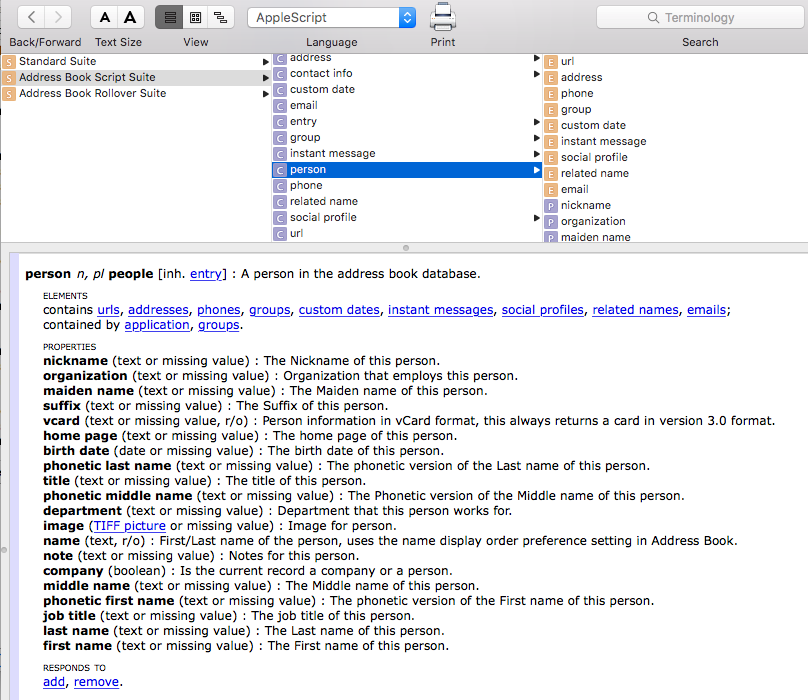
書き出すことができる項目は、スクリプトエディタ.appで表示できる連絡先アプリの辞書にある、Personのクラスのエレメントやプロパディの情報になります。